Can Teachers See When You Tab Out of a Canvas Quiz?
Yes, if they look. Canvas logs every time you tab out of a quiz but doesn't alert your teacher live. What the entry looks like and what makes teachers check.
Don't tab out at all. ExamClutch reads each question on your Canvas quiz and fills in the answer with a double-click, so the log shows you answering and nothing else.
Canvas records every tab-out in the quiz log, but it never alerts your teacher; they only see it if they open the log. Two exceptions change that: proctoring software, which can flag tab-outs as they happen, and a live, in-person quiz where the teacher is watching screens.
Does Canvas notify the teacher when you tab out?
No. There is no live notification, email or dashboard alert in Canvas when a student leaves a quiz page. The event is written to the log silently and sits there until someone reads it.
That surprises people, because the log is so precise. But Canvas was built to keep a record, not to watch you in real time. Your teacher could be teaching another class, asleep, or never look at it at all.
What your teacher sees if they do look
The quiz log is opened from your individual quiz results, one attempt at a time. A tab-out looks like this:
| Time | Event |
|---|---|
| 10:02:14 | Viewed (and possibly read) question 6 |
| 10:02:31 | Stopped viewing the Canvas quiz-taking page |
| 10:03:47 | Resumed |
| 10:03:52 | Answered question 6 |
From that, a teacher can read three things:
- That you left. Not where you went.
- How long you were gone. Here, 1 minute 16 seconds.
- What happened next. An answer five seconds after coming back is the detail that makes a tab-out look purposeful.
What they cannot see is the other tab. Canvas has no idea whether you went to ChatGPT, your notes or a Spotify playlist. The full explanation of why is in Does Canvas Track Tabs During a Quiz?
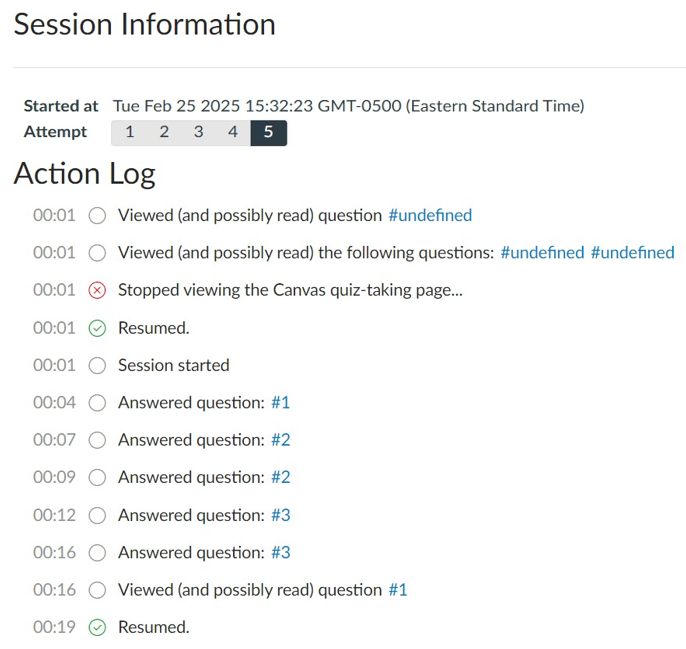
What a teacher actually opens: the Action Log for one attempt. A tab-out appears as a red "Stopped viewing" line followed by a green "Resumed".
When teachers actually check the log
Most teachers never open most quiz logs. With a class of 150, reading every timeline is not realistic. The log gets opened when something prompts it:
- A score that doesn't fit. A student who has been scoring 60% suddenly gets 100%.
- A suspiciously fast finish. Full marks in a fraction of the time everyone else needed.
- Matching wrong answers. Several students picking the same unusual wrong option often means they all used the same source.
- A report. A classmate mentions something, or questions turn up on Chegg or Quizlet.
- Teachers who check everyone. Some do review every log on high-stakes exams, especially in large intro courses with a history of problems.
Once the log is open, one tab-out is not the problem. A tab-out before nearly every answer is. We cover how teachers interpret the log in Can Professors See the Canvas Quiz Log?
How long can you tab out before it matters?
There is no threshold in Canvas. Every exit is logged, whether it lasts one second or ten minutes. What changes is how it reads:
- A few seconds, once or twice: looks like a notification or a stray click. Almost never questioned.
- A long gap on one question: stands out, especially if the answer comes right after.
- Regular exits before each answer: the pattern teachers look for, regardless of how short each one is.
Canvas "Stopped Viewing" Flag Explained goes into what triggers an entry and how teachers weigh the timing.
When teachers can see it live
Two situations do give teachers a real-time view:
Proctoring software. Honorlock and Proctorio run as browser extensions alongside the quiz. They can detect when you open another tab, flag it immediately and, depending on the settings, block the site or bring in a live proctor. Respondus LockDown Browser stops you tabbing out at all. If you had to install something or do a webcam check before starting, assume tab-outs are visible as they happen. See ProctorU, Respondus and Honorlock: How Detection Actually Works.
Quizzes taken in class. If you are on your laptop in a lecture hall, your teacher or a TA may simply be walking behind you. No software required.
What to do if you tabbed out by accident
Accidental exits are extremely common and teachers know it. A notification, a sleeping screen or a reflexive Alt+Tab all get logged.
- Finish the quiz normally. Don't panic-submit.
- Note what happened, in case you are asked.
- If you are asked, explain it plainly. A single short exit with an innocent reason is rarely pursued.
If your log shows exits you don't remember, read Canvas Said I Left the Screen When I Didn't.
How to avoid tabbing out at all
If the reason you tab out is to look something up, every lookup leaves an entry. The fix is to stop leaving the page, and the methods for that are ranked by what they leave behind in How to Answer Canvas Quizzes Without Switching Tabs.
Answer inside the quiz with ExamClutch
ExamClutch works inside the Canvas page. It reads the question and its options, gets the answer, and fills it in when you double-click. You never tab out, so there is no "stopped viewing" entry next to your answer.
- Start it with Ctrl+Shift+X (Cmd+Shift+X on a Mac). Clicking an extension's toolbar icon opens a popup that takes focus, so the shortcut is the way to stay on the page.
- Works on Canvas Classic Quizzes and New Quizzes, Blackboard, Brightspace, Moodle, Schoology, McGraw Hill and Google Forms.
- Multiple choice, multi-select, dropdown and fill-in-the-blank.
- It never submits for you, and it is not for proctored exams: no extension runs in LockDown Browser.
Add ExamClutch to Chrome or try the free demo quiz first. Comparing options? See ExamClutch vs. Canvas Hack.
FAQ
Can teachers see when you tab out of a Canvas quiz? Yes, if they open your quiz log. It records each time you leave the quiz page and come back, with timestamps. Canvas does not alert them while it is happening.
Does Canvas notify teachers when you switch tabs? No. Canvas sends no live notification. The tab-out is only stored in the quiz log, which the teacher has to open themselves.
Can teachers see what tab you went to? No. Canvas only records that you left the quiz page, not which tab or app you switched to. Proctoring tools such as Honorlock and Proctorio are the exception.
Can teachers see if you tab out on Canvas New Quizzes? New Quizzes keeps its own activity log, opened from the Moderate page, so assume page exits can be recorded there as well.
Do teachers check the quiz log for every student? Usually not. Most open it when a score, a finishing time or a set of matching wrong answers looks unusual, though some review every log on major exams.
Is one tab-out enough to get you in trouble? Rarely. A single short exit looks like a notification or a stray click. Repeated exits before each answer are what teachers treat as suspicious.
Related reading
- Does Canvas Track Tabs During a Quiz?
- Can Professors See the Canvas Quiz Log?
- Canvas "Stopped Viewing" Flag Explained
- Does Canvas Record Your Screen During a Quiz?
- How to Answer Canvas Quizzes Without Switching Tabs
- Can Canvas See If You Copy and Paste?
- Can Canvas Detect Split Screen?
- Can Canvas Detect Google Lens?
- Can Canvas Detect Cheating on Your Phone?
- Canvas Quiz Solver: How ExamClutch Works on Canvas
- Accused of Cheating Over a Canvas Quiz Log? Read This First
- Can Professors See What You Open on Canvas?
Ready to stop fighting your LMS?